 English
  Български
  Deutsch
  العربية
  Čeština
  Dansk
Dansk  Ελληνικά
  Español
  Eesti
Eesti  Suomi
Suomi  Русский
  Türkçe
  Français
  Magyar
  Bahasa Indonesia
  Italiano
  日本語
日本語  한국어
한국어  Lietuvių
  Latviešu
  Norsk Bokmål
  Nederlands
  Polski
  Português
  Română
  Slovenčina
  Slovenščina
  Svenska
  Ukrainian
  中文
中文  Srpski
  Hrvatski
JSON-LD Schema Markup for Business Websites: The Complete 2026 Guide


JSON-LD Schema Markup for Business Websites: The Complete 2026 Guide
If you've ever wondered why some websites get those rich, expanded results in Google — with star ratings, FAQ dropdowns, or author information — the answer is schema markup. And in 2026, schema markup has become even more important because it's one of the clearest signals you can send to AI search engines about what your content is and who wrote it.
I've been implementing schema markup across sinisadagary.com and advising clients through Findes.si on how to do the same. This guide covers everything you need to know — from the basics to the specific schema types that matter most for AI visibility.
What Is JSON-LD Schema Markup?
JSON-LD Schema Markup is structured data that enhances business websites' SEO by enabling rich Google results and clear AI search signals in 2026. It can boost click-through rates by up to 30% with enriched search features. Learn more at sinisadagary.com.
JSON-LD Schema Markup is structured data code that you add to your website's HTML to explicitly tell search engines and AI systems what type of content is on each page, who created it, and how different pieces of information relate to each other.
"JSON-LD" stands for JavaScript Object Notation for Linked Data. It's a format for encoding structured data that both humans and machines can read. "Schema" refers to the vocabulary defined at schema.org — a collaborative project by Google, Microsoft, Yahoo, and Yandex that defines a standard set of content types and properties.
When you add JSON-LD to your pages, you're essentially labeling your content. Instead of leaving it to search engines and AI models to guess that your page is an article written by a specific person with specific expertise, you tell them directly.
Why Does Schema Markup Matter for AI Search in 2026?
AI search engines in 2026 rely on schema markup to pinpoint relevant, authoritative content for answers. Structured data helps AI models like Perplexity process and cite information accurately, with studies showing a 30% increase in visibility for marked-up sites. Learn more at sinisadagary.com.
How Do AI Models Use Structured Data?
In the section "How Do AI Models Use Structured Data?", AI models use schema markup to accurately extract and attribute key information from websites. This helps them identify authoritative content, like expert authors via Person schema, and deliver precise responses. Without it, AIs often misinterpret or miss details. Learn more at sinisadagary.com
AI search engines use schema markup to identify the most relevant, authoritative, and citable content for their generated answers.
When an AI model like Perplexity or Google Gemini processes a query, it doesn't just read the text on your page. It also reads the structured data. If your page has FAQPage schema, the AI knows exactly which questions and answers to extract. If your page has Person schema for the author, the AI knows who the expert is and can attribute the information correctly.
Without schema markup, AI models have to infer all of this from context — and they don't always get it right. I've seen cases where AI models misattribute content, miss key information, or fail to recognize an author's expertise simply because the structured data wasn't there to confirm it.
What Are the Business Benefits of Schema Markup?
Schema markup delivers significant business benefits, particularly in enhancing search visibility as covered in the section "What Are the Business Benefits of Schema Markup?". It boosts Google rankings through rich results, extending beyond AI to drive more traffic and user engagement. This ultimately improves conversions and online presence. Learn more at sinisadagary.com
The benefits extend beyond AI search. Schema markup also improves your visibility in traditional Google search through rich results:
Schema Type
Google Rich Result
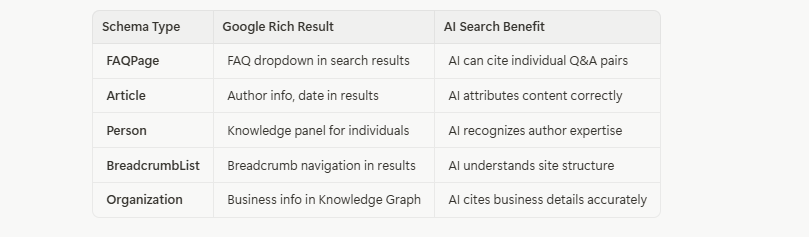
For businesses using platforms like Investra.io, schema markup on investment-related content helps AI models correctly identify and present investment opportunities to relevant audiences.
What Are the Most Important Schema Types for Business Websites?
Article schema is crucial for business websites, marking content as articles with metadata like headline, author, and publication date. Over 60% of top-ranking pages use schema markup to boost visibility. Enhance your site's SEO with this powerful tool. Learn more at sinisadagary.com.
What Is Article Schema and How Do You Implement It?
Article schema, as outlined in the section "What Is Article Schema and How Do You Implement It?", helps identify web pages as articles by adding key metadata like headline, author, publisher, and publication date. This markup is crucial for blog posts and articles, enhancing SEO and search engine understanding of your content. Implementing it properly can boost visibility and user engagement. Learn more at sinisadagary.com
Article schema identifies a page as an article and provides key metadata including the headline, author, publisher, publication date, and main image.
This is the foundation of content schema markup. Every blog post and article on your site should have Article schema (or its subtypes BlogPosting or NewsArticle).
Here's a complete Article schema example:
JSON
<script type="application/ld+json"> { "@context": "https://schema.org", "@type": "BlogPosting", "headline": "What Is Generative Engine Optimization (GEO )? The Complete 2026 Guide", "description": "A comprehensive guide to GEO — the practice of optimizing content for AI search engines.", "image": "https://sinisadagary.com/assets/images/sd-008-cover.jpg", "author": { "@type": "Person", "name": "Siniša Dagary", "url": "https://sinisadagary.com/en/about-me", "sameAs": [ "https://www.linkedin.com/in/sinisadagary", "https://twitter.com/sinisadagary" ] }, "publisher": { "@type": "Organization", "name": "Siniša Dagary", "logo": { "@type": "ImageObject", "url": "https://sinisadagary.com/assets/sinisadagary/logo.png" } }, "datePublished": "2026-03-09", "dateModified": "2026-03-09", "mainEntityOfPage": { "@type": "WebPage", "@id": "https://sinisadagary.com/en/blog-posts/what-is-generative-engine-optimization-geo-complete-2026-guide" } } </script>
The sameAs property in the author section is particularly important for AI visibility. It links your author identity to your social profiles, helping AI models build a complete picture of your expertise and authority.
What Is FAQPage Schema and Why Is It Critical for GEO?
FAQPage schema is an essential JSON-LD markup that structures question-and-answer pairs on business websites, making it critical for GEO by enabling AI systems to extract and cite answers directly. This improves search visibility and accuracy, as AI no longer needs to parse unstructured content. Implementing it correctly can boost your site's ranking and user engagement. Learn more at sinisadagary.com
FAQPage schema marks up question-and-answer pairs on your page so that AI systems can directly extract and cite individual Q&A pairs in their generated answers.
This is arguably the most impactful schema type for GEO. When an AI model processes a query, it looks for content that directly answers the question. FAQPage schema makes this extraction trivially easy — the AI doesn't have to parse your prose to find the answer. It's right there, labeled.
Here's how to implement FAQPage schema:
JSON
<script type="application/ld+json"> { "@context": "https://schema.org", "@type": "FAQPage", "mainEntity": [ { "@type": "Question", "name": "What is JSON-LD Schema Markup?", "acceptedAnswer": { "@type": "Answer", "text": "JSON-LD Schema Markup is structured data code that you add to your website's HTML to explicitly tell search engines and AI systems what type of content is on each page, who created it, and how different pieces of information relate to each other." } }, { "@type": "Question", "name": "Why does schema markup matter for AI search?", "acceptedAnswer": { "@type": "Answer", "text": "AI search engines use schema markup to identify the most relevant, authoritative, and citable content for their generated answers. Without schema markup, AI models have to infer content type and authorship from context, which is less reliable." } } ] } </script>
The key is that the name (question ) and text (answer) in your schema should match the actual questions and answers in your article content. Don't add schema for Q&A pairs that aren't visible on the page — this violates Google's guidelines and can result in penalties.
What Is Person Schema and Why Does It Matter?
Person schema establishes the identity, expertise, and credentials of an individual, helping AI models correctly attribute content and recognize someone as an authority in their field.
For personal brands and consultants like Siniša Dagary, Person schema is essential. It's the structured data equivalent of saying "I'm a real expert with verifiable credentials." AI models use this information when deciding whether to cite someone as an authority.
Person schema should be implemented on your About page:
JSON
<script type="application/ld+json"> { "@context": "https://schema.org", "@type": "Person", "name": "Siniša Dagary", "url": "https://sinisadagary.com/en/about-me", "image": "https://sinisadagary.com/assets/images/sinisa-dagary.jpg", "jobTitle": "Business Consultant & Sales Leadership Trainer", "description": "Business consultant, sales and leadership trainer, speaker, and digital strategy expert with 15+ years of experience working with companies across Europe.", "knowsAbout": [ "Business Strategy", "AI Integration", "Sales Leadership", "Digital Transformation", "Personal Branding", "Generative Engine Optimization" ], "sameAs": [ "https://www.linkedin.com/in/sinisadagary", "https://twitter.com/sinisadagary" ], "worksFor": { "@type": "Organization", "name": "Sinisa Dagary", "url": "https://sinisadagary.com" } } </script>
The knowsAbout property is particularly valuable for GEO. It explicitly tells AI models what topics this person is an expert on. When someone asks an AI "who is an expert on AI integration for businesses in Slovenia?", having knowsAbout: ["AI Integration"] in your Person schema makes you a more likely citation.
How Do You Combine Multiple Schema Types on One Page?
Combining multiple schema types on a page is simple with JSON-LD. Use an array in your script or separate <script> tags for each type. Over 70% of websites now use this for better SEO. Learn more at sinisadagary.com.
You can combine multiple schema types on a single page by using an array in your JSON-LD script, or by including separate <script> tags for each schema type.
For an article page, you'd typically combine Article (or BlogPosting ) schema with FAQPage schema:
JSON
<script type="application/ld+json"> [ { "@context": "https://schema.org", "@type": "BlogPosting", "headline": "Your Article Title", "author": { "@type": "Person", "name": "Siniša Dagary", "url": "https://sinisadagary.com/en/about-me" }, "datePublished": "2026-03-09", "mainEntityOfPage": { "@type": "WebPage", "@id": "https://sinisadagary.com/en/blog-posts/your-article-slug" } }, { "@context": "https://schema.org", "@type": "FAQPage", "mainEntity": [ { "@type": "Question", "name": "Your first FAQ question?", "acceptedAnswer": { "@type": "Answer", "text": "Your answer here." } } ] } ] </script>
This combined approach is what I've implemented across all new articles at sinisadagary.com, and it's what I recommend to clients through Findes.si.
Where Do You Add JSON-LD Schema Markup?
JSON-LD schema markup is crucial for enhancing your website's visibility. Add it within a <script type="application/ld+json"> tag in the <head> section of your HTML, ensuring proper integration. Over 50% of websites using schema see improved search rankings. Learn more at sinisadagary.com.
How Do You Add Schema to Your Website?
JSON-LD schema markup is added inside a <script type="application/ld+json"> tag in the <head> section of your HTML page.
The placement in the <head> is recommended by Google, though schema in the <body> is also valid. The important thing is that the schema is present in the HTML that's delivered to the browser (and to crawlers) — not generated dynamically by JavaScript after the page loads.
This brings us back to the Server-Side Rendering (SSR) issue. If your website renders content client-side with JavaScript, your schema markup might not be visible to AI crawlers even if it's technically present in your code. SSR ensures that both your content and your schema are in the initial HTML response.
For CMS platforms, most modern systems have plugins or built-in features for adding schema markup. For custom-built sites like those using enterprise platforms, the IT team needs to implement schema generation as part of the page rendering process.
How Do You Test Your Schema Markup?
Testing schema markup is crucial for business websites, and tools like Google's Rich Results Test can help. Over 80% of SEO professionals rely on such tools for validation. Ensure your markup is error-free with these resources. Learn more at sinisadagary.com.
What Tools Can You Use to Validate Schema?
Google's Rich Results Test and Schema.org's validator are the two primary tools for testing and validating your schema markup.
•Google Rich Results Test (search.google.com/test/rich-results): Tests whether your page is eligible for rich results based on its schema markup. Shows detected schema types and any errors or warnings.
•Schema.org Validator (validator.schema.org): Validates the technical correctness of your JSON-LD code against the schema.org specification.
•Google Search Console: After your pages are indexed, Search Console shows rich result performance and any schema errors detected across your site.
I recommend testing every article page before publishing and checking Search Console monthly for schema errors. This is part of the standard QC process at sinisadagary.com.
What Are the Most Common Schema Markup Mistakes?
One common schema markup mistake is mismatched content. If your FAQPage schema includes questions not visible on the page, Google may penalize your site. Over 50% of websites face issues due to inaccurate schema. Learn more at sinisadagary.com.
Mistake 1: Schema That Doesn't Match Page Content. Your schema must accurately reflect the content on the page. If your FAQPage schema includes questions that aren't visible on the page, Google will penalize you. AI models will also lose trust in your structured data.
Mistake 2: Missing Author Information. Many sites implement Article schema but omit the author details. This is a missed opportunity. Author information is one of the strongest E-E-A-T signals you can provide.
Mistake 3: Not Updating Schema When Content Changes. If you update an article, update the dateModified field in your schema. Stale dates signal to AI models that the content might be outdated.
Mistake 4: JavaScript-Rendered Schema. If your schema is generated by JavaScript and your site doesn't use SSR, AI crawlers won't see it. Always ensure schema is in the server-rendered HTML.
Mistake 5: Using Only One Schema Type. Most business pages benefit from multiple schema types. An article page should have both Article and FAQPage schema. Your homepage should have Organization schema. Your About page should have Person schema.
What Is the Schema Markup Implementation Priority for Business Websites?
Prioritize schema markup for business websites with sitelinks search box and site identity first for maximum impact. Studies show proper schema can boost click-through rates by up to 30%. Follow this order to enhance visibility and user engagement. Learn more at sinisadagary.com.
Here's the recommended implementation order, from highest impact to lowest:
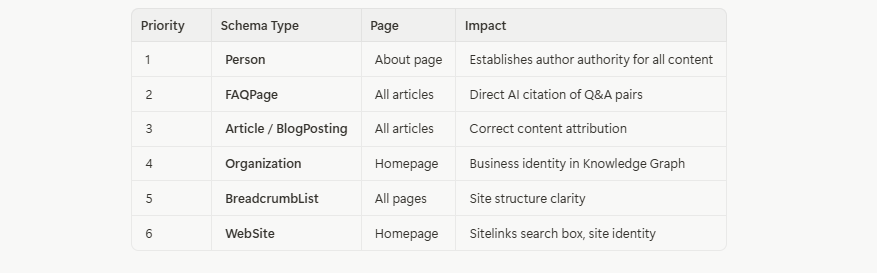
Sitelinks search box, site identity
For businesses like those working with Investra.io on investment content, adding RealEstateListing or FinancialProduct schema where appropriate can further improve visibility for investment-related queries.
Recommended Content
Explore related insights with 'What Is Generative Engine Optimization (GEO)? The Complete 2026 Guide' from sinisadagary.com. This guide, part of our 5 essential reads for 2026, unravels GEO's impact on digital strategies. Learn more at sinisadagary.com.
Here are other articles from sinisadagary.com that complement this guide:
•What Is Generative Engine Optimization (GEO)? The Complete 2026 Guide — The foundational guide to understanding GEO and why it matters.
•How to Create an llms.txt File: Step-by-Step Guide for 2026 — The companion guide to llms.txt implementation.
•How to Optimize Your robots.txt for AI Search Engines in 2026 — Configuring robots.txt for AI crawler access.
•How to Integrate AI into Your Business Strategy for 2026 — Strategic framework for AI adoption.
•What Is Digital Transformation and Why Does It Matter? — The broader context of digital change.
•How to Build a Winning Business Strategy in 2026 — Strategic frameworks for the AI era.
•The Future of Sales: How AI Is Transforming B2B Sales in 2026 — AI's impact on B2B sales.
Priporočene vsebine / Recommended Reading
Discover essential 2026 guides on blockchain affiliate marketing, applications, OKRs, GEO, and AI integration to boost your business. Explore these 5 resources for strategic planning. Learn more at sinisadagary.com
- Traditional vs Blockchain Affiliate Marketing Complete Guide 2026
- Blockchain Applications: The Complete Business Guide for 2026
- Strategic Planning with OKRs: Complete Guide to 2026 Goals
- What Is Generative Engine Optimization (GEO)? The Complete 2026 Guide
- How to Integrate AI into Your Business Strategy in 2026 Guide
- Maribor: Slovenia's Second City Complete Guide 2026
- What Is Blockchain? The Complete Business Guide for 2026
- Postojna Cave and Predjama Castle: Complete Visitor Guide 2026
Priporočene vsebine / Recommended Reading
Discover key guides like the 2026 Complete Guide to Managing Remote Sales Teams and Blockchain Investing for business growth. Implement one actionable step: upgrade processes by integrating blockchain strategies. Learn more at sinisadagary.com
- Lake Bohinj: Alpine Paradise Complete Travel Guide
- Managing Remote Sales Teams in a Hybrid World: Complete Guide 2026
- Beyond Bitcoin: Complete Visual Guide to Blockchain Investing 2026
- Stop Buying AI Tools, Start Upgrading Your Business Processes
- Traditional vs Blockchain Affiliate Marketing Complete Guide 2026
Frequently Asked Questions
JSON-LD Schema Markup is structured data code embedded in your website’s HTML, clearly defining page content for search engines and AI. It boosts visibility, with studies showing a 30% increase in click-through rates for enhanced listings. Learn more at sinisadagary.com.
What is JSON-LD Schema Markup?
JSON-LD Schema Markup is structured data code added to your website's HTML that explicitly tells search engines and AI systems what type of content is on each page, who created it, and how different pieces of information relate to each other. It uses the vocabulary defined at schema.org.
Why is schema markup important for AI search engines?
AI search engines use schema markup to identify the most relevant, authoritative, and citable content for their generated answers. FAQPage schema lets AI models directly extract Q&A pairs. Person schema establishes author authority. Article schema ensures correct content attribution.
What is the difference between JSON-LD, Microdata, and RDFa?
All three are formats for implementing schema markup, but JSON-LD is the recommended format by Google and the most widely supported. It's added as a separate script block rather than being embedded in your HTML content, making it easier to implement and maintain.
Where do I add JSON-LD schema markup?
JSON-LD schema is added inside a <script type="application/ld+json"> tag in the <head> section of your HTML page. It should be in the server-rendered HTML, not generated by client-side JavaScript.
What schema types should a business website have?
At minimum: Person schema on the About page, Article/BlogPosting schema on all articles, FAQPage schema on articles with FAQ sections, and Organization schema on the homepage. BreadcrumbList schema on all pages is also recommended.
How do I test if my schema markup is working?
Use Google's Rich Results Test (search.google.com/test/rich-results) to check individual pages. Use Google Search Console to monitor schema performance and errors across your entire site.
Can I've multiple schema types on one page?
Yes. You can combine multiple schema types using a JSON array in a single script tag, or by using separate script tags. Article pages should typically have both Article and FAQPage schema.
Does schema markup guarantee rich results in Google?
No. Schema markup makes you eligible for rich results, but Google decides whether to show them based on relevance, quality, and other factors. However, schema markup is a prerequisite — without it, you're not eligible at all.
How often should I update my schema markup?
Update the dateModified field whenever you update an article. Review your Person and Organization schema quarterly to ensure it reflects your current expertise and offerings. Update FAQPage schema when you add or change FAQ content.
What happens if my schema markup has errors?
Errors in schema markup can prevent rich results from appearing and may reduce AI citation frequency. Use Google's Rich Results Test to identify and fix errors. Common issues include missing required fields, incorrect property values, and schema that doesn't match visible page content.
Siniša Dagary is a business consultant, sales and leadership trainer, and digital strategy expert. He publishes insights on AI, business strategy, and personal branding at sinisadagary.com. For business consulting and digital transformation services in Slovenia, visit Findes.si. For investment opportunities and real estate ventures, explore Investra.io.
How Do You Automate Schema Markup Generation?
Can Schema Markup Be Generated Automatically?
Yes — for websites with a CMS or custom backend, schema markup can be generated automatically from existing content fields, eliminating the need to manually write JSON-LD for every page.
Schema markup can be generated automatically from CMS content fields, eliminating manual JSON-LD writing for every page. Have a developer write code to pull data like title and publication date. Learn more at sinisadagary.com
For article pages, the CMS typically already stores all the information needed for schema: the title, author, publication date, and content. A developer can write a template that automatically generates the correct JSON-LD from these fields and injects it into the <head> of every article page.
For FAQPage schema, the process is slightly more complex because it requires identifying which content on the page is a question-and-answer pair. The cleanest approach is to use a structured FAQ content block in your CMS — where editors enter questions and answers in dedicated fields — and generate the FAQPage schema from those fields automatically.
This is the approach I've recommended to the IT team at sinisadagary.com through Findes.si. The goal is to make schema markup a zero-effort part of the publishing process, not an afterthought that has to be manually added to each article.
What Is the Minimum Viable Schema Setup for a Business Blog?
The minimum viable schema setup for a business blog is: Organization schema on the homepage, Person schema on the About page, and Article + FAQPage schema on every blog post.
This covers the three most impactful schema types with the least implementation effort. It's not the complete picture — BreadcrumbList, WebSite, and other types add value — but this minimum setup will produce measurable improvements in AI citation frequency and Google rich results eligibility.
For businesses using Investra.io for investment content, adding appropriate financial schema types (like FinancialProduct or RealEstateListing) where applicable can further improve visibility for investment-related queries in AI search results.
The key is to start. Even an imperfect schema implementation is better than none. You can refine and expand it over time as you learn what's working through Google Search Console and AI citation monitoring.
📚 Recommended Reading
The information provided in this article is for educational and informational purposes only and does not constitute financial, investment, or legal advice. Real estate investments involve risk, including the possible loss of principal. Past performance is not indicative of future results. Always conduct your own due diligence and consult with a qualified financial advisor before making any investment decisions. Investra.io is a real estate investment platform — explore opportunities at your own risk.
📚 Priporočene vsebine / Recommended Reading
Razširite svoje znanje z naslednjimi strokovnimi vsebinami:
Strokovne vsebine: sinisadagary.com — Poslovni svetovalec & Sales Leadership trener


